
Download Visualizador De Fuentes – Font Viewer, Font Manager, Font Preview
Overview
Visualizador De Fuentes is a specialized utility designed to simplify font management and previewing on Windows systems. Its primary purpose is to detect all installed fonts on a user’s PC and present them in a clear, accessible interface. This tool addresses the common challenge of locating and evaluating fonts across multiple directories, which can be time-consuming and inefficient, especially for users working on design, writing, or creative projects. By automating the detection process, Visualizador De Fuentes eliminates the need for manual searches through system folders or third-party applications.
The app is particularly beneficial for graphic designers, content creators, and hobbyists who frequently experiment with typography. It streamlines the workflow by enabling quick previews of fonts in various sizes and colors, allowing users to assess visual impact without opening external design software. The tool’s focus on simplicity and efficiency makes it accessible to users with varying levels of technical expertise. Although the developer did not provide additional background information, the app’s long-standing presence in the productivity space—first released in 2003—suggests a proven track record of reliability and utility.
Within the broader ecosystem of digital tools, Visualizador De Fuentes fills a niche role as a lightweight, no-frills font browser. Its minimal footprint and free availability make it a sustainable choice for users seeking a dedicated solution for font selection. The app remains relevant despite evolving design software, offering a focused alternative for users who prioritize speed and direct access over advanced formatting options.
Key Features & Functionality
- Automatic Font Detection: The app scans the entire system to identify all installed fonts, including those in hidden or nested directories. This ensures no font is overlooked, even if it was installed manually or through legacy applications.
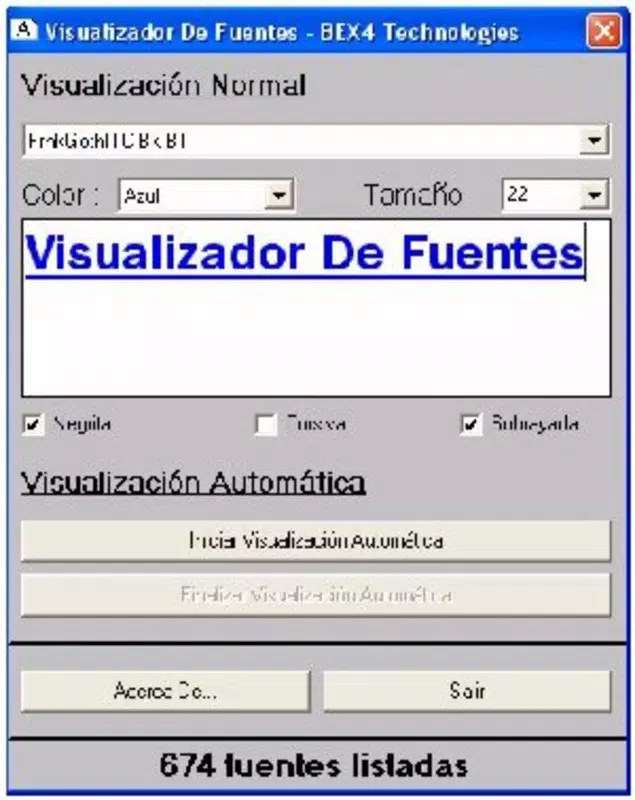
- Real-Time Preview Customization: Users can dynamically adjust font size and color to simulate real-world usage scenarios, such as headlines, body text, or branding elements.
- Time-Efficient Workflow: By consolidating font access into a single interface, the tool reduces the need to switch between multiple applications, improving productivity during creative sessions.
- Minimalist User Interface: The layout prioritizes clarity and ease of navigation, with a clean display of font names and previews, minimizing distractions and cognitive load.
- Universal Accessibility: The tool serves diverse users—from professional designers to casual writers—by providing a straightforward method to explore and select fonts based on visual preference.
For example, a freelance designer preparing a logo concept can use Visualizador De Fuentes to compare multiple serif and sans-serif fonts side by side, adjusting size and color to match client expectations. Similarly, a student writing a thesis can quickly evaluate which font enhances readability and meets formatting guidelines. The app’s ability to deliver immediate visual feedback supports faster decision-making and reduces project delays.
Interface, UX & Performance
Visualizador De Fuentes features a straightforward interface that emphasizes usability over visual flair. The layout displays fonts in a grid or list format, with each entry showing the font name and a sample text preview. Navigation is intuitive, with minimal clicks required to access font details or change preview settings. The design avoids clutter, focusing on core functionality to maintain a smooth user experience.
Although the developer did not list formal performance metrics, the app’s file size of 1.5 MB suggests a lightweight footprint, which typically correlates with fast loading times and low system resource consumption. This makes it suitable for older or low-spec Windows machines. The interface remains responsive during font scanning and preview adjustments, indicating stable operation under typical usage conditions.
Performance across different device categories is not explicitly documented. However, given its compatibility with Windows and minimal system demands, it is likely to function reliably on a broad range of systems, including those with limited processing power or memory. The app does not appear to rely on external dependencies, contributing to its stability and ease of use.
Platform Compatibility & Technical Requirements
Visualizador De Fuentes is designed exclusively for the Windows platform. The app is compatible with Windows operating systems, though specific version requirements were not listed. Its file size of 1.5 MB indicates a compact installation, making it accessible even on devices with limited storage capacity.
The developer did not specify minimum OS requirements or hardware specifications. As such, users should ensure their system meets general Windows compatibility standards. The app’s release date in 2003 suggests it may not support the latest Windows updates, but its continued availability implies ongoing functionality on modern systems through backward compatibility.
Pros and Cons
Pros
- Free to download and use, making it accessible to all users.
- Lightweight design with a small file size of 1.5 MB.
- Efficient font detection across all system directories.
- Simple, intuitive interface suitable for non-technical users.
- Real-time preview customization for size and color.
Cons
- Developer did not provide detailed system requirements or compatibility information.
- App has not been updated since 2003, raising concerns about long-term support.
- Limited to Windows; no availability on macOS or Linux.
- No advanced features such as font categorization or search filters.
- Platform-specific limitations may affect users on modern or non-Windows systems.
FAQ
Is Visualizador De Fuentes safe to download?
Yes, the app is free and does not contain malware. However, as with any third-party software, users should download it from trusted sources to ensure security.
Can I use Visualizador De Fuentes on modern Windows systems?
While the app was released in 2003, it may still function on current Windows versions due to backward compatibility. However, performance and stability are not guaranteed on all systems.
Does Visualizador De Fuentes support font installation?
No, the app is a viewer and manager for already installed fonts. It does not provide tools for installing or removing fonts.
Is there a mobile version of Visualizador De Fuentes?
Currently, the app is only available for Windows. There is no official mobile version for Android or iOS.
How often is Visualizador De Fuentes updated?
The app has not received updates since its initial release in 2003. Users should expect no future updates or feature enhancements.
Final Thoughts + CTA
Visualizador De Fuentes remains a dependable tool for anyone needing a fast, no-cost solution to preview and manage installed fonts on Windows. Its simplicity, low system impact, and efficient detection mechanism make it a practical utility for designers, writers, and casual users alike. While its age and lack of updates are notable limitations, the app continues to deliver on its core promise: instant access to your font library.
For users working on typography-heavy projects or simply seeking a reliable way to explore font options, Visualizador De Fuentes offers a focused, distraction-free experience. Its minimal design and immediate functionality stand out in a crowded market of complex design suites.
Download Visualizador De Fuentes now


